

Table of Contents
- Why Cross Departmental Collaboration Matters
- Breaking Down Organizational Silos to Improve Cross Departmental Collaboration
- Interdepartmental Communication Strategies That Drive Results
- Cross-Functional Team Collaboration Best Practices
- Tools for Cross-Departmental Collaboration and Integration
- Examples of Successful Cross-Departmental Collaboration
- The Role of Leadership in Enabling Team Alignment
- Common Collaboration Failures and How to Avoid Them
Last Updated: July 29, 2026
Why Cross Departmental Collaboration Matters
Organizations that fail to improve cross departmental collaboration strategies face a silent killer: duplicated effort, missed opportunities, and teams working at cross-purposes. At Your Life’s Path, we’ve observed that the gap between high-performing and struggling organizations rarely comes down to talent or resources. It comes down to how well departments actually talk to each other and align on shared goals.
When marketing, sales, operations, and customer service operate in silos, the cost compounds. Teams reinvent solutions others have already solved. Customer insights get trapped in one department while another wastes time chasing the same leads. Projects stall because nobody knew what the adjacent team was doing. The friction is invisible until you measure it, and by then, you’ve already lost months of productivity.
The stakes are real. Organizations with strong cross-functional alignment report higher employee engagement, faster time-to-market on new initiatives, and measurably better customer outcomes. This isn’t soft culture work. It’s a business multiplier. Below, we’ll cover seven concrete strategies to break down the walls between departments, establish clear communication protocols, and create the conditions where teams actually want to collaborate.
The real problem isn’t that teams don’t want to collaborate, it’s that most organizations have never created the systems, leadership clarity, or psychological safety required to make it happen at scale.
Breaking Down Organizational Silos to Improve Cross Departmental Collaboration
Organizational silos form naturally. Each department has its own goals, metrics, budget cycles, and reporting lines. Over time, teams develop their own language, processes, and ways of working. What starts as specialization hardens into isolation.
The danger isn’t specialization itself, it’s when departments optimize for their own success at the expense of the organization’s overall mission. Sales closes a deal with unrealistic timelines. Operations scrambles to deliver. Customer success inherits an unhappy customer. Nobody was wrong; the system was broken.
Breaking silos requires three parallel moves:
Make cross-departmental work visible. Most silos persist because nobody sees the cost. Start tracking where handoffs happen, where communication breaks down, and which projects require coordination across teams. Use shared project management tools that force transparency. When every department can see what others are working on, the incentive to collaborate increases naturally.
Restructure incentives. If you measure departments in isolation, they’ll optimize in isolation. Introduce shared KPIs that require collaboration to achieve. For example, instead of measuring Sales on bookings and Support on ticket resolution time, measure both on customer lifetime value. This single shift reframes collaboration from optional to essential.
Rotate people across departments. The most effective silos are broken by people who’ve worked in multiple departments and understand different perspectives. Encourage rotations, cross-functional project teams, and temporary assignments. People who’ve sat in another department’s chair become natural bridges.
The most common mistake is announcing “we need better collaboration” without changing the systems that reward siloed behavior. Culture change without structural change is theater.
Interdepartmental Communication Strategies That Drive Results
Communication breakdown is the symptom; unclear expectations and misaligned priorities are the disease. You can’t fix the symptom without addressing the root cause.
Start by establishing what communication actually needs to happen. Most organizations communicate too much (endless meetings, Slack noise) while missing critical handoffs. Map the decisions that require input from multiple departments. Identify the information that flows between teams. Then design communication around those specific needs rather than defaulting to "we’ll have a weekly meeting."
Establishing Clear Channels and Protocols
Different types of communication need different channels. Strategic decisions require synchronous discussion. Status updates can be asynchronous. Quick clarifications work in chat. Decisions that affect multiple departments need documentation.
Create a communication protocol that specifies:
- Which decisions require cross-departmental input (and who gets a seat at the table)
- How feedback gets requested and how long teams have to respond
- Where final decisions get documented so everyone sees them
- How often synchronous meetings actually happen (fewer than you think)
- What information gets shared automatically versus on-demand
Most organizations over-invest in synchronous meetings and under-invest in clear documentation. A 30-minute meeting with unclear outcomes wastes more time than a well-written email that answers questions upfront.
For cross-functional teams specifically, establish a single source of truth for project information. Whether it’s a shared spreadsheet, project management tool, or internal wiki, the point is that everyone knows where to find the current state of work. This reduces the need for status update meetings and prevents the "I didn’t know that changed" problem.
Asynchronous Communication for Remote and Hybrid Teams
Remote and hybrid work has made asynchronous communication essential, yet most teams still operate as if everyone’s in the same office, calling impromptu meetings, expecting immediate Slack responses, and creating artificial urgency around decisions that don’t actually need to be made today. The cost is real: unnecessary synchronous meetings consume 15-20% of a distributed team’s week, and context-switching between time zones compounds the problem.
Asynchronous communication works when you build it into your workflow intentionally. Here’s a concrete framework:
1. The decision document template. Before any cross-departmental decision, the owning team writes a brief document (300-500 words) that includes:
- Context: What problem are we solving? Why does this matter?
- Options considered: What were the alternatives? Why did we rule them out?
- Recommendation: What are we proposing and why?
- Trade-offs: What are we giving up by choosing this path?
- Input needed: Specifically, which departments need to weigh in? What are we asking them to evaluate?
- Deadline: When do we need feedback? (Usually 48-72 hours for non-urgent decisions.)
This format forces clarity upfront and eliminates the "I didn’t understand what you were asking" problem. Teams that use this consistently report 30-40% fewer clarification rounds.
2. Feedback loops with explicit ownership. Asynchronous feedback only works if someone actually reads it and incorporates it. Assign one person to synthesize feedback from all departments, document what changed based on that feedback, and explain why certain suggestions weren’t adopted. This person becomes the "decision shepherd." Without this role, feedback gets lost and teams feel unheard.
3. Escalation paths for disagreement. Asynchronous communication breaks down when departments disagree. You can’t resolve a real conflict in a document thread. Define upfront: if departments can’t reach consensus in the feedback window, who makes the final call? Usually it’s the person with the most at stake (the product owner, the operations leader, etc.). Make this clear in the decision document. Teams accept a decision they disagree with if they know the process was fair and the decision-maker had good information.
4. Searchable decision history. Every decision document lives in one place, a shared wiki, a decision log, or a dedicated Slack channel that’s archived and searchable. This serves two purposes: (a) new team members can understand why decisions were made, and (b) teams can reference past decisions to avoid re-litigating the same questions. A searchable decision history is worth more than any collaboration tool.
5. Synchronous time for conflict resolution only. Reserve live meetings for discussions that genuinely require real-time dialogue: resolving disagreements, brainstorming novel problems, working through complex trade-offs, or building relationships. Don’t use synchronous time for status updates, information sharing, or decisions that can be made asynchronously. This reframe alone cuts meeting time by 40-50% while improving decision quality.
Common failure mode: The false deadline. Teams write asynchronous decision documents but set artificial urgency ("feedback due in 4 hours") because someone wants a quick answer. This defeats the purpose. Departments that need time to consult their own teams can’t participate. Rushed feedback is shallow feedback. Set realistic deadlines, 48-72 hours for most decisions, longer for high-stakes choices. If you’re in a true emergency, acknowledge it and make the decision synchronously. But most organizations confuse "I want this done" with "this actually needs to be done today." They’re different.
Another failure mode: Asynchronous communication without context. A decision document lands in a Slack channel with no explanation. People don’t know they’re supposed to read it. Feedback trickles in late or not at all. The owning team assumes silence means agreement. Weeks later, someone says "I didn’t know about this." Prevent this by: (a) explicitly tagging the people whose input you need, (b) explaining why their perspective matters, and (c) setting a clear feedback deadline in the message itself. Make it easy for people to know they’ve been asked.
Teams that master asynchronous communication often move faster than teams in the same office because they force clarity upfront. There’s no "we’ll figure it out in a meeting." Everything has to be explicit. The trade-off is that asynchronous communication requires more discipline and better writing. It’s worth it.
Cross-Functional Team Collaboration Best Practices
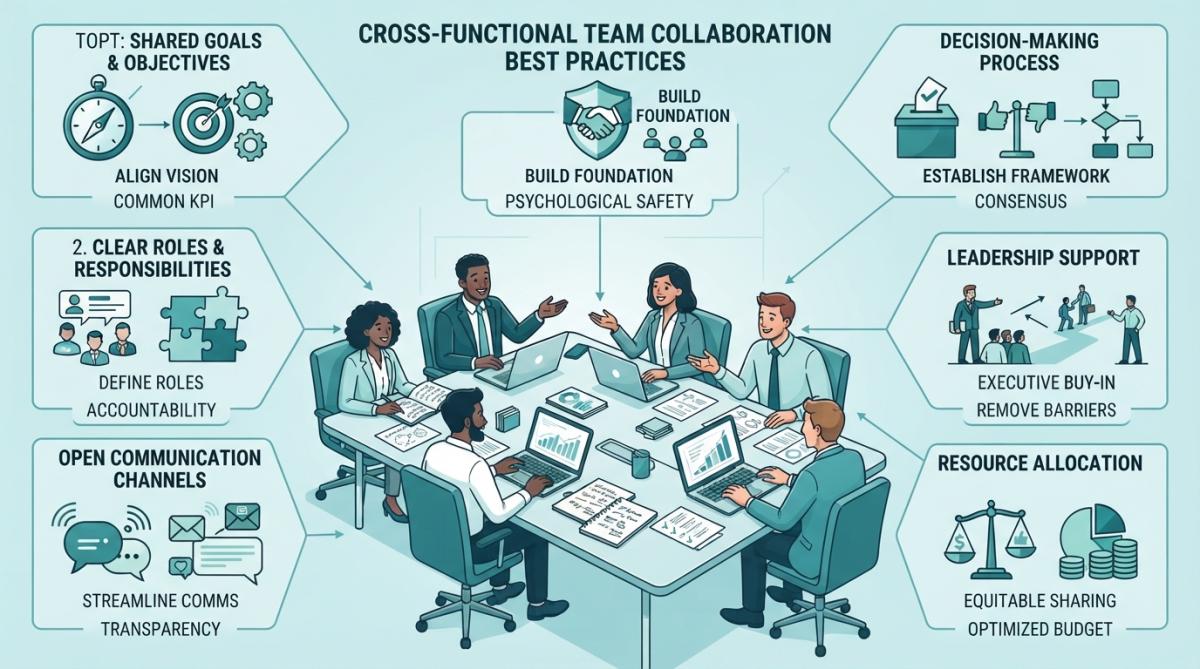
Cross-functional teams are where the real work of organizational collaboration happens. A task force pulling people from marketing, engineering, operations, and finance to solve a specific problem can move faster and think more creatively than a single department working alone. But only if the team is set up to actually function.
The first mistake is treating cross-functional work as a side project. People join the team while keeping their full-time departmental responsibilities. Their attention splits. Priorities conflict. The cross-functional work loses.
Instead, make cross-functional assignments explicit. If someone is 50% allocated to a task force, reduce their departmental work by 50%. Give the team a clear charter: what problem are they solving, what authority do they have, what’s the timeline, and who makes final decisions when the team disagrees?
Defining Shared Objectives and KPIs
Cross-functional teams fail when members optimize for their home department’s goals. The product team wants features that look good in a demo. Engineering wants technical elegance. Sales wants a quick launch. Everyone’s right from their perspective, but the team has no shared definition of success.
Define team-level objectives that supersede departmental goals. Use the OKR (Objectives and Key Results) framework or a similar approach:
- Objective: A clear, qualitative description of what the team is trying to achieve
- Key Results: 3-5 measurable outcomes that indicate success
Example: A cross-functional team launching a new product might have:
Objective: Deliver a product that customers love and sales can confidently sell
Key Results:
- Achieve 8+ net promoter score from beta customers
- Sales team completes product training with 90%+ competency
- Launch with 50+ enterprise customers in first quarter
- Support team reports <2% product-related escalations
These KPIs are team-level, not departmental. Engineering doesn’t get measured on code quality in isolation. Sales doesn’t get measured on bookings without customer satisfaction. The metrics force alignment.
The most effective cross-functional teams we’ve seen at Your Life’s Path share one trait: they measure success on outcomes the customer cares about, not outputs the department cares about. This reframe alone eliminates 80% of internal conflict.
Fostering Psychological Safety and Trust
Collaboration requires people to speak up, admit what they don’t know, and challenge ideas without fear of retribution. This is psychological safety, and it’s the foundation that every other collaboration practice rests on.
Psychological safety doesn’t mean everyone is nice. It means people trust that speaking up won’t damage their standing or career. A team with psychological safety has vigorous debates and still ships. A team without it has polite meetings and then work-arounds happen in hallways.
Build psychological safety by:
- Model vulnerability. Leaders who admit mistakes and ask for help signal that it’s safe to do the same. If the leader pretends to know everything, the team will too.
- Respond well to bad news. When someone brings a problem, thank them. Don’t shoot the messenger. The team watches how you respond to the first person who raises a concern and calibrates accordingly.
- Separate idea evaluation from person evaluation. "That idea won’t work because X" is feedback on the idea. "You’re not thinking clearly" is an attack on the person. Train teams on the difference.
- Make it safe to fail. Small failures in service of learning should be celebrated, not punished. If failure is career-limiting, people will hide problems until they explode.
Psychological safety is invisible until it’s missing. You notice it when people stop speaking up, when conflicts fester instead of getting addressed, or when the real decisions happen offline. If you see those patterns, psychological safety is broken and needs to be rebuilt intentionally.
Tools for Cross-Departmental Collaboration and Integration
The right tools remove friction from collaboration. The wrong tools create more work. Most organizations have too many tools. Marketing uses one project management platform, engineering uses another, sales uses a CRM, support uses a ticketing system, and nobody’s data talks to each other. Teams spend time manually syncing information instead of actually collaborating.
The cost of tool sprawl is hidden but real. A typical organization with 100+ employees loses 5-8 hours per week per person to context-switching between tools, manual data entry, and searching for information across platforms. That’s 500-800 hours per week of lost productivity. Over a year, that’s equivalent to losing 12-20 full-time employees.
Start by mapping what information needs to flow between departments. Then choose tools that enable that flow. A few principles:
Map Information Flow Before Choosing Tools
Before you evaluate any tool, answer these questions:
- What decisions require cross-departmental input? (List them.)
- What information needs to flow between departments to make those decisions? (Be specific: customer feedback, project status, budget data, etc.)
- How often does that information need to be updated? (Real-time? Daily? Weekly?)
- Who needs to access it? (Just one department or multiple?)
- What happens if that information is wrong or out of date? (This tells you how critical the integration is.)
Most organizations skip this step and buy tools based on features or brand reputation. Then they wonder why adoption is low. The tool doesn’t solve the actual problem because nobody defined the problem first.
Integration Patterns That Actually Work
Once you’ve mapped information flow, you need integration. There are three patterns:
Pattern 1: Centralized source of truth. One system (usually a CRM, ERP, or project management tool) becomes the authoritative record. Other systems pull data from it or push data to it. Example: Salesforce is the source of truth for customer information. Your project management tool pulls customer data from Salesforce so teams can see which customer a project serves. Your support system pushes ticket data back to Salesforce so sales can see support history.
Advantage: Single source of truth reduces conflicts and confusion. Disadvantage: The central system becomes a bottleneck. If it goes down, everything breaks.
Pattern 2: Distributed sources with scheduled sync. Different departments own different systems. Data syncs between them on a schedule (hourly, daily, or weekly). Example: Engineering owns the code repository. Marketing owns the content management system. A nightly sync pushes release notes from the repository to the CMS so marketing can publish them.
Advantage: Each department keeps their specialized tool. Disadvantage: Data is never real-time. If something changes, other departments don’t see it until the next sync.
Pattern 3: API-first with real-time events. Systems communicate via APIs and webhooks. When something changes in one system, it immediately triggers an update in another. Example: When a customer is added to the CRM, a webhook automatically creates a user account in your project management tool and sends a notification to the onboarding team.
Advantage: Real-time, flexible, and scales well. Disadvantage: Requires technical setup and ongoing maintenance.
Most organizations use a mix of all three. The key is being intentional about which pattern you use for which information flow.
Measuring Tool Adoption and Effectiveness
A tool that nobody uses is worse than no tool at all. Yet most organizations deploy tools and never measure whether they’re actually being used or whether they’re solving the problem.
Track these metrics:
1. Adoption rate. What percentage of the intended users are actually using the tool? (Target: 80%+ for critical tools.) If adoption is below 70%, the tool isn’t solving a problem people care about. Investigate why.
2. Frequency of use. How often are people using the tool? (Daily, weekly, monthly?) If people use it once a month, it’s not a core part of their workflow.
3. Data freshness. Is the information in the tool current? If project status is updated once a week but decisions need to be made daily, the tool isn’t serving its purpose. Audit a sample of records and check when they were last updated.
4. Time saved. Pick a specific workflow (e.g., "getting customer information for a sales call") and measure how long it takes before and after the tool. If the tool doesn’t save time, it’s not working.
5. Reduction in duplicate work. Are teams still doing manual workarounds? If sales is using the CRM but also maintaining a separate spreadsheet, the CRM isn’t solving the problem. Ask teams: "What information are you tracking outside this tool?" That’s your gap.
6. Integration health. If you have integrations, are they working? Check: Are syncs completing successfully? Is data arriving on time? Are there errors? A broken integration is worse than no integration because people trust data that’s actually wrong.
Review these metrics quarterly. If a tool is underperforming, you have three options: (a) change how you’re using the tool (better training, clearer process), (b) change the tool itself, or (c) accept that this tool isn’t the right fit and stop using it. Most organizations do none of these and just accept low adoption as inevitable.
The Tool Selection Checklist
When evaluating a new tool, ask:
- Does it solve a specific problem we’ve identified? (Not "it might be useful someday.")
- Can it integrate with our existing tools? (APIs, webhooks, or native integrations?)
- What’s the learning curve? (If it takes 20 hours of training, adoption will be low.)
- Who owns the implementation? (If nobody’s accountable, it won’t get set up properly.)
- What’s the cost of switching away later? (Data lock-in, custom configurations, training investment?)
- Does it support asynchronous workflows? (Or does it force real-time collaboration?)
- How’s the vendor’s track record on security and uptime? (Check reviews and case studies.)
Most importantly: Don’t buy a tool to solve a process problem. If teams don’t collaborate because incentives are misaligned, a collaboration tool won’t fix that. If decisions take too long because authority is unclear, a project management tool won’t fix that. Tools amplify good processes and amplify bad ones. Fix the process first, then choose a tool that supports it.
The tool itself isn’t the solution; clarity about who needs to talk to whom and why is. Tools just make that clarity easier to implement and maintain.
Examples of Successful Cross-Departmental Collaboration
Real examples beat abstract theory. Here’s what cross-departmental collaboration looks like when it works:
Product launch alignment: A software company’s product, engineering, marketing, sales, and support teams formed a task force three months before a major product launch. They met weekly to align on the customer problem the product solved, the messaging they’d use, the support scenarios they’d encounter, and the sales positioning. Marketing didn’t create messaging that engineering couldn’t support. Sales didn’t make promises support couldn’t keep. When launch day arrived, every team moved in the same direction. The launch exceeded targets by 40%.
Operational efficiency: A manufacturing company’s operations, quality, and supply chain teams were constantly at odds. Operations wanted to maximize throughput. Quality wanted to minimize defects. Supply chain wanted to minimize inventory. The conflict was real, those goals do trade off. But instead of each team optimizing separately, they created a shared metric: cost per unit delivered on time with zero defects. That single metric forced them to collaborate on process improvements that improved all three. Within six months, they’d reduced costs by 12% while improving both quality and on-time delivery.
Customer experience: A services company’s sales, delivery, and support teams had a handoff problem. Sales would oversell. Delivery would struggle to deliver. Support would inherit angry customers. They created a cross-functional review process: before closing any deal, sales, delivery, and support had to sign off. This seemed like it would slow sales down. Instead, deals closed faster because there were fewer surprises. Delivery could plan better. Support had happier customers. Everyone won.
These examples share a pattern: the collaboration wasn’t about being nice to each other. It was about creating systems where collaboration was the path of least resistance.
The Role of Leadership in Enabling Team Alignment
Leadership sets the conditions for collaboration or prevents it. The best communication strategy fails if leaders undermine it. The clearest shared goals don’t matter if leaders reward siloed behavior.
Leaders enable collaboration by:
- Modeling cross-functional thinking. If the CEO makes decisions in isolation, departments will too. If leaders regularly seek input from other departments and visibly incorporate that feedback, teams notice and follow.
- Removing barriers to collaboration. Sometimes teams want to collaborate but can’t because of organizational structure, budget cycles, or approval processes. Leaders remove those barriers.
- Resolving conflicts that teams can’t resolve. Not every conflict can be resolved at the team level. Some require leadership to make a call. Leaders who avoid these decisions create gridlock.
- Celebrating collaboration. What gets rewarded gets repeated. If individual heroics get celebrated and collaborative wins get ignored, people will pursue heroics. Make collaboration visible and reward it.
- Being clear about non-negotiables. Teams can’t collaborate on everything. Some decisions need to be made by individual departments. Leaders clarify which decisions are collaborative and which are departmental. This paradoxically enables more collaboration because teams know the boundaries.
Leadership also matters in a subtler way: setting the tone for psychological safety. If leaders punish failure, teams hide problems. If leaders listen to dissenting views and incorporate them, teams speak up. If leaders admit mistakes, teams do too. The culture of collaboration starts with how leaders behave.
Common Collaboration Failures and How to Avoid Them
Most collaboration initiatives fail for the same reasons. Knowing what to avoid is half the battle.
Failure 1: Collaboration theater without structural change. You announce a cross-functional initiative, form a task force, have some meetings, and declare victory. But nothing actually changed. Departments still have conflicting incentives. Budget cycles still reward individual optimization. The task force was a distraction, not a transformation.
Fix: Change the systems. Align incentives. Restructure budget cycles if needed. Make collaboration the easier path, not the harder one.
Failure 2: Collaboration without clear decision-making authority. A cross-functional team spends weeks debating options and reaches consensus. Then someone’s boss overrides the decision. The team feels betrayed. Future collaboration efforts get half-hearted participation.
Fix: Before the team starts, clarify who makes the final decision if the team can’t agree. Usually it’s the person with the most at stake. Make that clear upfront.
Failure 3: Too many meetings, too little progress. Teams meet constantly but decisions don’t get made. Information doesn’t flow between meetings. Meetings become status updates instead of decision forums.
Fix: Be ruthless about meeting necessity. If it can be an email or a document, it shouldn’t be a meeting. If it is a meeting, have a clear agenda and a decision to make.
Failure 4: Collaboration without clarity on roles. A cross-functional team has eight people but nobody knows who’s responsible for what. Accountability gets diffused. Things fall through the cracks.
Fix: Assign clear ownership for different parts of the work. Cross-functional doesn’t mean everyone owns everything. It means different people own different pieces and coordinate at the boundaries.
Failure 5: Ignoring communication preferences. Some people are direct communicators. Others are indirect. Some prefer written updates. Others want conversations. Teams that ignore these differences create friction.
Fix: Understand how different people prefer to communicate and accommodate those preferences where possible. If you have a team where everyone’s communication style is different, that’s not a problem, it’s a feature. You get more perspectives. Just acknowledge the differences and work with them. Tools like DiSC Workplace Profile help teams recognize their own communication patterns and understand how different behavioral styles approach collaboration differently.
The pattern across all these failures is the same: collaboration requires intentional design. It doesn’t happen by accident. Most organizations leave it to chance and then wonder why collaboration feels hard.
Improving cross departmental collaboration strategies isn’t a one-time initiative, it’s a fundamental shift in how your organization operates. The best organizations we’ve seen treat collaboration as a capability to be built and maintained, not a nice-to-have culture initiative. If you’re serious about making this work, start by understanding how your teams actually communicate and where the biggest collaboration gaps exist. Your Life’s Path offers Virtual Workshops and the DiSC Catalyst For Teams platform to help you build these capabilities at scale. DiSC Catalyst combines behavioral assessments with collaborative learning tools, helping teams understand communication preferences across departments, identify where collaboration gaps exist, and build structured processes for cross-functional work. With features like Free EPIC Sub-Accounts for easy administration and flexible workshop options, you can scale collaboration practices across your entire organization without adding administrative burden. Get started with Your Life’s Path and transform how your departments work together.
Frequently Asked Questions
What are the main benefits of cross-departmental collaboration?
Cross-departmental collaboration breaks down organizational silos, accelerates problem-solving, and improves operational efficiency. When teams share objectives and work toward unified goals, organizations experience faster innovation, better resource allocation, and stronger team cohesion. Employees also gain broader perspectives and develop more comprehensive solutions that account for multiple viewpoints, leading to higher-quality outcomes and improved corporate culture.
What are the biggest challenges in cross-functional team collaboration?
Common challenges include communication barriers, conflicting priorities, unclear shared objectives, and resistance to change. Teams may struggle with workflow transparency, lack of trust across departments, and difficulty establishing clear KPIs that satisfy all stakeholders. Remote and hybrid work environments add complexity through asynchronous communication delays. Leadership misalignment and insufficient tools for cross-team synergy can further hinder progress and reduce business agility.
How can interdepartmental communication strategies improve team alignment?
Effective interdepartmental communication strategies establish clear channels, define shared language, and create feedback loops that ensure all teams understand priorities. Implementing centralized content libraries, regular cross-functional meetings, and transparent workflow systems helps break communication barriers. Asynchronous communication tools support remote teams while maintaining knowledge sharing. When stakeholders understand how their work connects to broader strategic alignment and unified goals, collaboration becomes more natural and productive.
What tools and approaches help measure cross-departmental collaboration success?
Track success through shared KPIs that reflect team alignment and unified goals. Measure project completion rates across departments, employee engagement scores, and time-to-market for cross-functional initiatives. Use collaboration software analytics to assess communication frequency and workflow transparency. Survey teams on psychological safety and trust levels. Monitor operational efficiency gains and cost savings from reduced silos. Successful collaboration shows improved stakeholder engagement, faster decision-making, and measurable business agility improvements.
This article was written using GrandRanker